> For the complete documentation index, see [llms.txt](https://docs.flexikanban.ai/llms.txt). Markdown versions of documentation pages are available by appending `.md` to page URLs; this page is available as [Markdown](https://docs.flexikanban.ai/composite-kanban/working-with-composite-kanban-layout.md).
# Working with Composite Kanban Layout
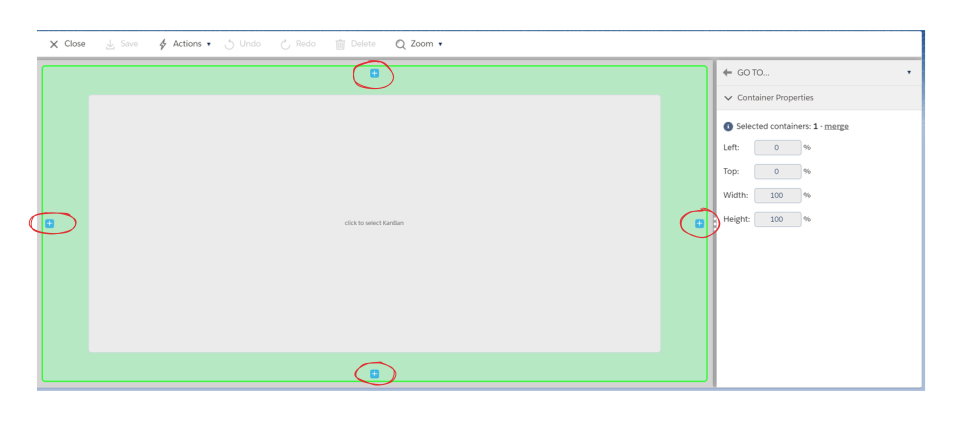
After creation of a composite kanban, the Kanban Builder will open and it will contain one container. Hover mouse on container (1) - it will be highlighted:
 Click on highlighted area. Click on "+" markers to add containers:
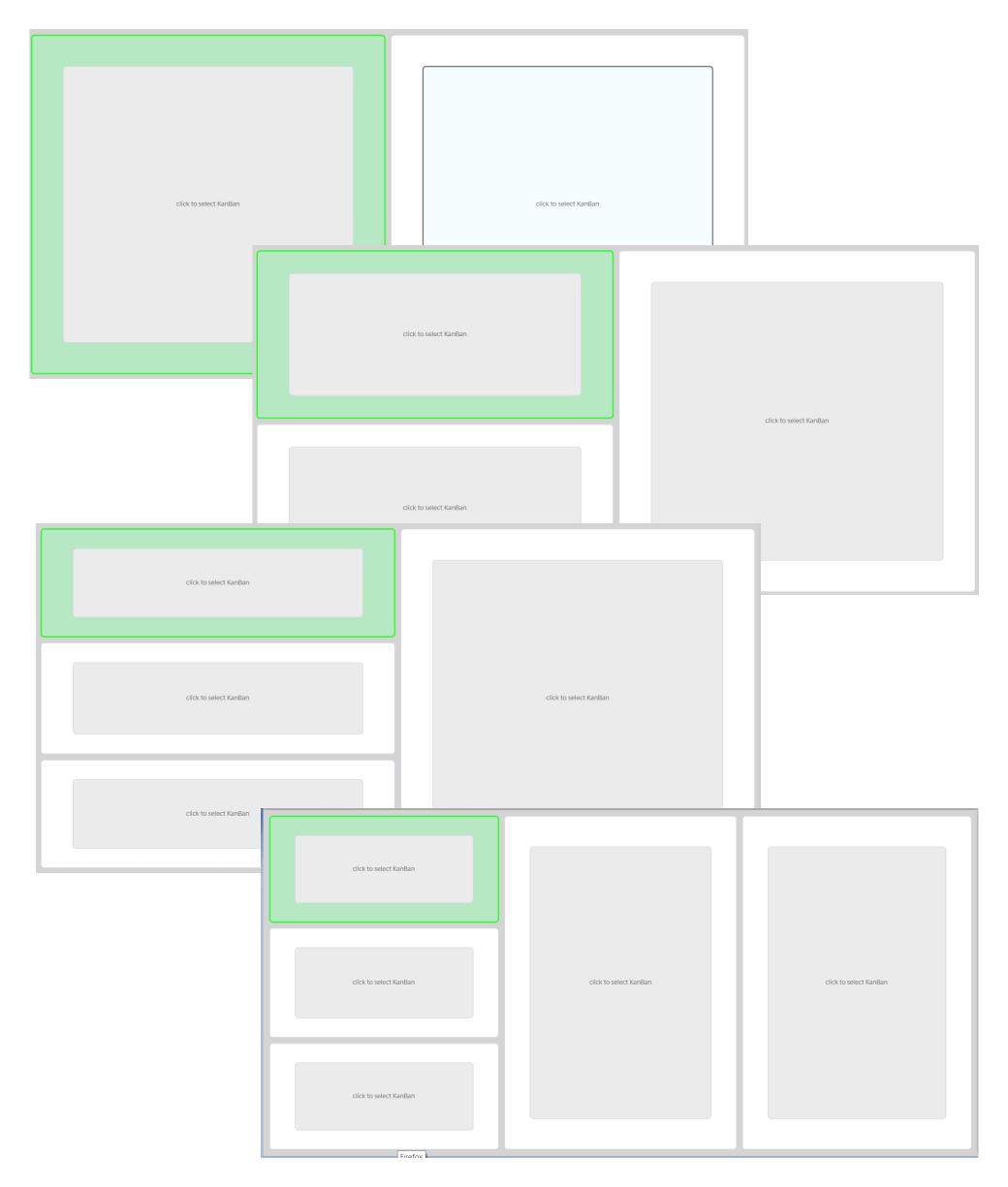
 By default container will be added at the proper side and both containers (existing and new) will take all available room together. Adjacent containers will get equal sizes:
 If click on container, a "Container Properties" will be opened at the right sidebar:
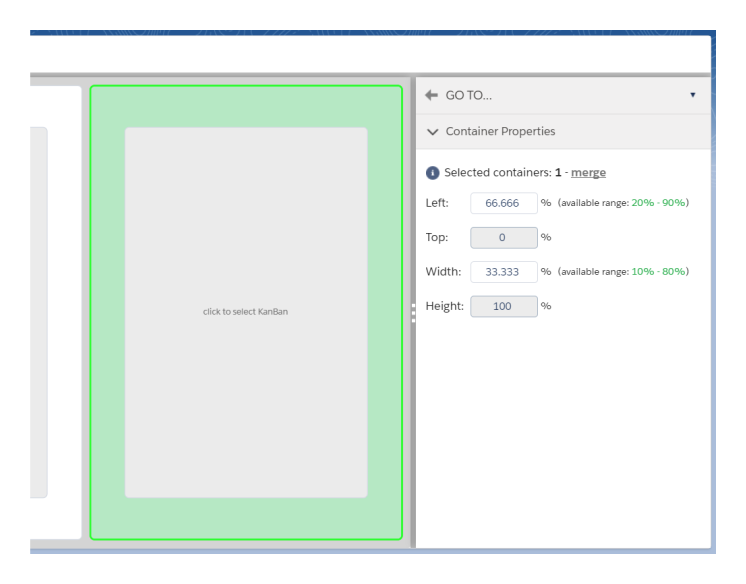 Properties are:
* **Left** - position of the container relatively to left side of Kanban. Can be changed by Kanban admin if this container is not leftmost one.
* **Top** - position of the container relatively to top side of Kanban. Can be changed by Kanban admin if this container is not topmost one.
* **Width** - width of the container in % of Kanban width. Can be changed by Kanban admin if this container and at least one adjacent neighbor can be resized horizontally together.
* **Height** - height of the container in % of Kanban height. Can be changed by Kanban admin if this container and at least one adjacent neighbor can be resized vertically together.
Changing one property can cause changes in other:
Properties are:
* **Left** - position of the container relatively to left side of Kanban. Can be changed by Kanban admin if this container is not leftmost one.
* **Top** - position of the container relatively to top side of Kanban. Can be changed by Kanban admin if this container is not topmost one.
* **Width** - width of the container in % of Kanban width. Can be changed by Kanban admin if this container and at least one adjacent neighbor can be resized horizontally together.
* **Height** - height of the container in % of Kanban height. Can be changed by Kanban admin if this container and at least one adjacent neighbor can be resized vertically together.
Changing one property can cause changes in other:
 {% hint style="info" %}
System will show available value ranges of these properties and will auto-correct them when user try to set them to impermissible values. Allowed values are depending on current containers layout.
If some properties are blocked it means that selected container has no place to expend/shift or can not be shrank without causing a gap.
{% endhint %}
{% hint style="warning" %}
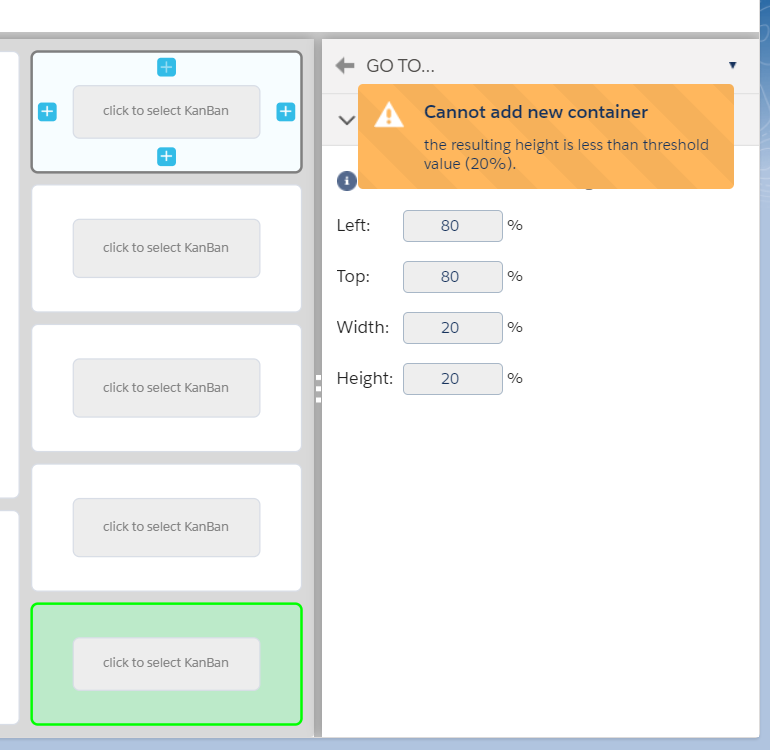
If any of container properties will be out of permitted range, system will not allow adding new containers and show proper warning:
{% hint style="info" %}
System will show available value ranges of these properties and will auto-correct them when user try to set them to impermissible values. Allowed values are depending on current containers layout.
If some properties are blocked it means that selected container has no place to expend/shift or can not be shrank without causing a gap.
{% endhint %}
{% hint style="warning" %}
If any of container properties will be out of permitted range, system will not allow adding new containers and show proper warning:
 {% endhint %}
Selected adjacent containers can be merge into one by clicking on "merge" link:
{% endhint %}
Selected adjacent containers can be merge into one by clicking on "merge" link:
 Containers can be merged into one only when:
* resulting container will be rectangle
* all of them contain no more than 1 kanban
If containers can not be merged system will not allow it.
User can remove selected container(s) by clicking on button "Delete" on top of kanban. Sizes and positions of adjacent containers will be recalculated to get rid of possible gaps.
{% hint style="warning" %}
Note: not all gaps can be removed automatically. In this case system will not allow to delete container and show proper warning message.
{% endhint %}
Containers can be merged into one only when:
* resulting container will be rectangle
* all of them contain no more than 1 kanban
If containers can not be merged system will not allow it.
User can remove selected container(s) by clicking on button "Delete" on top of kanban. Sizes and positions of adjacent containers will be recalculated to get rid of possible gaps.
{% hint style="warning" %}
Note: not all gaps can be removed automatically. In this case system will not allow to delete container and show proper warning message.
{% endhint %}
 ---
# Agent Instructions
This documentation is published with GitBook. GitBook is the documentation platform designed so that both humans and AI agents can read, navigate, and reason over technical content effectively. Learn more at gitbook.com.
## Querying This Documentation
If you need additional information that is not directly available in this page, you can query the documentation dynamically by asking a question.
Perform an HTTP GET request on the current page URL with the `ask` query parameter, and the optional `goal` query parameter:
```
GET https://docs.flexikanban.ai/composite-kanban/working-with-composite-kanban-layout.md?ask=&goal=
```
`ask` is the immediate question: it should be specific, self-contained, and written in natural language.
`goal` is optional and describes the broader end goal you are ultimately trying to accomplish on behalf of the user. GitBook uses it to tailor the answer towards what is most useful for that goal.
The response will contain a direct answer to the question and relevant excerpts and sources from the documentation.
Use this mechanism when the answer is not explicitly present in the current page, you need clarification or additional context, or you want to retrieve related documentation sections.
---
# Agent Instructions
This documentation is published with GitBook. GitBook is the documentation platform designed so that both humans and AI agents can read, navigate, and reason over technical content effectively. Learn more at gitbook.com.
## Querying This Documentation
If you need additional information that is not directly available in this page, you can query the documentation dynamically by asking a question.
Perform an HTTP GET request on the current page URL with the `ask` query parameter, and the optional `goal` query parameter:
```
GET https://docs.flexikanban.ai/composite-kanban/working-with-composite-kanban-layout.md?ask=&goal=
```
`ask` is the immediate question: it should be specific, self-contained, and written in natural language.
`goal` is optional and describes the broader end goal you are ultimately trying to accomplish on behalf of the user. GitBook uses it to tailor the answer towards what is most useful for that goal.
The response will contain a direct answer to the question and relevant excerpts and sources from the documentation.
Use this mechanism when the answer is not explicitly present in the current page, you need clarification or additional context, or you want to retrieve related documentation sections.