> For the complete documentation index, see [llms.txt](https://docs.flexikanban.ai/llms.txt). Markdown versions of documentation pages are available by appending `.md` to page URLs; this page is available as [Markdown](https://docs.flexikanban.ai/components/forms/basics/form-building-overview.md).
# Form Building Overview
Navigate to Forms tab and click "New" button.
 New Form screen will show up. First, select a Data Source. Data source is object the form is associated with:
 {% hint style="success" %}
If you can't find your object in the list it means it maybe has not been added to list of "Allowed objects" on "Settings" tab (Settings -> [Objects Settings](/references/application-settings.md#object-settings)).
{% endhint %}
Once data source is selected, all object required fields will appear in a new form default section. Other object fields you can find in the "Data Source Fields" section of the left sidebar. Fields are sorted alphabetically and grouped in collapsible sections:
{% hint style="success" %}
If you can't find your object in the list it means it maybe has not been added to list of "Allowed objects" on "Settings" tab (Settings -> [Objects Settings](/references/application-settings.md#object-settings)).
{% endhint %}
Once data source is selected, all object required fields will appear in a new form default section. Other object fields you can find in the "Data Source Fields" section of the left sidebar. Fields are sorted alphabetically and grouped in collapsible sections:
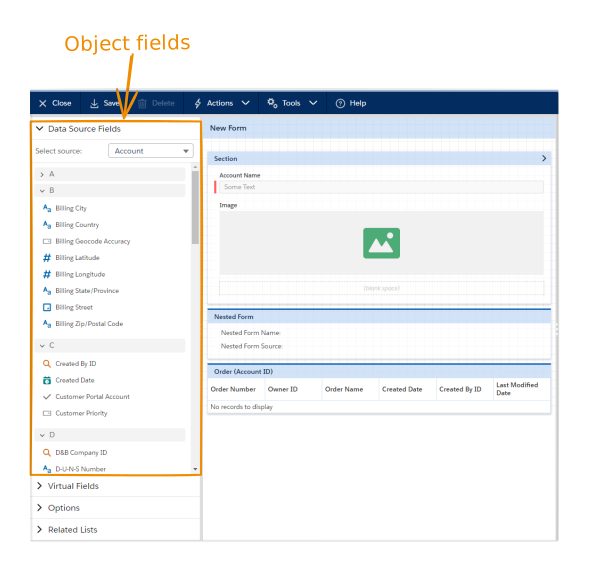 User can add to a form other type of fields as:
* [Virtual fields](/components/forms/components/add-and-remove-form-components.md#virtual-fields)
* [Options](/components/forms/components/add-and-remove-form-components.md#options) (sections, blank spaces, custom buttons, lists, file and image inputs, static texts, etc.)
* [Related Lists](/components/forms/components/add-and-remove-form-components.md#related-lists)
{% hint style="info" %}
See proper article about fields and other form components and how to add them to the form.
{% endhint %}
Using components of the Right sidebar you can:
* Settings - set basic properties of form or form elements
* Context - pick fields of available context objects
* Search - find location of form elements
User can add to a form other type of fields as:
* [Virtual fields](/components/forms/components/add-and-remove-form-components.md#virtual-fields)
* [Options](/components/forms/components/add-and-remove-form-components.md#options) (sections, blank spaces, custom buttons, lists, file and image inputs, static texts, etc.)
* [Related Lists](/components/forms/components/add-and-remove-form-components.md#related-lists)
{% hint style="info" %}
See proper article about fields and other form components and how to add them to the form.
{% endhint %}
Using components of the Right sidebar you can:
* Settings - set basic properties of form or form elements
* Context - pick fields of available context objects
* Search - find location of form elements
 Form builder toolbar contains the following components:
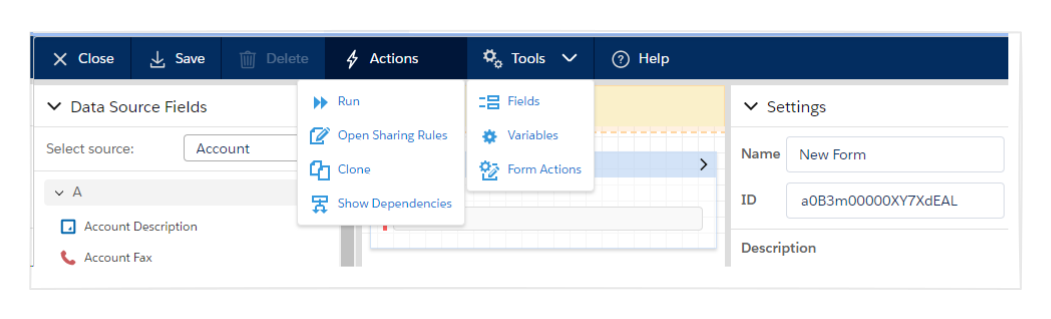 * **"Close"** button - closes currently opened form and returns to page what user navigated from. If there are unsaved changes, asks for confirmation.
* **"Save"** button - saves changes in currently open form. If this button is not disabled, this indicated the presence of unsaved changes.
* **"Delete"** button - deletes selected elements from the form canvas.
* **"Action"** menu contains the following items:
* **Run** - helps to [preview the form](/components/forms/basics/how-to-preview-the-form.md).
* **Open Sharing Rules** - user can [share the form](/components/forms/basics/how-to-configure-the-form-sharing-rules.md) to the Individual User, Public Group, Roles, Roles and Subordinates.
* **Clone** - clones the current form.
* [**Show Dependencies**](/components/forms/basics/understanding-the-form-dependencies.md) - helps to see where the current Form is used.
* **"Tools"** menu contains the following items:
* [**Fields**](/components/forms/tools/additional-fields.md) - allow to add needed fields to form context objects (useful in some cases)
* [**Variables**](/components/forms/tools/variables.md) - allow to manage form variables
* [**Form Action**s](/components/forms/tools/form-action.md) - allow to configure form actions
* **"Help"**- links to the Documentation web site.
---
# Agent Instructions
This documentation is published with GitBook. GitBook is the documentation platform designed so that both humans and AI agents can read, navigate, and reason over technical content effectively. Learn more at gitbook.com.
## Querying This Documentation
If you need additional information that is not directly available in this page, you can query the documentation dynamically by asking a question.
Perform an HTTP GET request on the current page URL with the `ask` query parameter, and the optional `goal` query parameter:
```
GET https://docs.flexikanban.ai/components/forms/basics/form-building-overview.md?ask=&goal=
```
`ask` is the immediate question: it should be specific, self-contained, and written in natural language.
`goal` is optional and describes the broader end goal you are ultimately trying to accomplish on behalf of the user. GitBook uses it to tailor the answer towards what is most useful for that goal.
The response will contain a direct answer to the question and relevant excerpts and sources from the documentation.
Use this mechanism when the answer is not explicitly present in the current page, you need clarification or additional context, or you want to retrieve related documentation sections.
* **"Close"** button - closes currently opened form and returns to page what user navigated from. If there are unsaved changes, asks for confirmation.
* **"Save"** button - saves changes in currently open form. If this button is not disabled, this indicated the presence of unsaved changes.
* **"Delete"** button - deletes selected elements from the form canvas.
* **"Action"** menu contains the following items:
* **Run** - helps to [preview the form](/components/forms/basics/how-to-preview-the-form.md).
* **Open Sharing Rules** - user can [share the form](/components/forms/basics/how-to-configure-the-form-sharing-rules.md) to the Individual User, Public Group, Roles, Roles and Subordinates.
* **Clone** - clones the current form.
* [**Show Dependencies**](/components/forms/basics/understanding-the-form-dependencies.md) - helps to see where the current Form is used.
* **"Tools"** menu contains the following items:
* [**Fields**](/components/forms/tools/additional-fields.md) - allow to add needed fields to form context objects (useful in some cases)
* [**Variables**](/components/forms/tools/variables.md) - allow to manage form variables
* [**Form Action**s](/components/forms/tools/form-action.md) - allow to configure form actions
* **"Help"**- links to the Documentation web site.
---
# Agent Instructions
This documentation is published with GitBook. GitBook is the documentation platform designed so that both humans and AI agents can read, navigate, and reason over technical content effectively. Learn more at gitbook.com.
## Querying This Documentation
If you need additional information that is not directly available in this page, you can query the documentation dynamically by asking a question.
Perform an HTTP GET request on the current page URL with the `ask` query parameter, and the optional `goal` query parameter:
```
GET https://docs.flexikanban.ai/components/forms/basics/form-building-overview.md?ask=&goal=
```
`ask` is the immediate question: it should be specific, self-contained, and written in natural language.
`goal` is optional and describes the broader end goal you are ultimately trying to accomplish on behalf of the user. GitBook uses it to tailor the answer towards what is most useful for that goal.
The response will contain a direct answer to the question and relevant excerpts and sources from the documentation.
Use this mechanism when the answer is not explicitly present in the current page, you need clarification or additional context, or you want to retrieve related documentation sections.